iCloud Private Relay vs a VPN: What Each Hides on iPhone and Mac
iCloud Private Relay and a VPN solve different problems. Private Relay is Apple's two-hop privacy service for Safari, DNS lookups and unencrypted app traffic; it hides your IP address from websites without letting any single company see both who you are and where you go, but it doesn't cover the encrypted traffic most apps use and it can't make you appear in another country. A VPN sends all of your device's traffic through one provider's server, which covers every app and lets you choose a country, but that one provider can see your IP and where you connect. If you mainly want private web browsing in Safari, Private Relay is enough; if you want every app covered, public Wi-Fi protection everywhere, or a different location, you need a VPN.
The pages that rank for this comparison are mostly written by VPN companies, and they tend to describe Private Relay as "Safari-only". That understates it. Below we use Apple's own technical overview and support pages to show exactly what each tool hides from whom, and the one rule that decides what happens when you turn both on.
The short answer
Use Private Relay if you pay for iCloud+ anyway and your concern is trackers and websites building a profile from your IP address while you browse. Use a VPN if you need to protect traffic from apps other than Safari, want to choose the country you appear in, or use networks where Private Relay isn't available or is blocked. You can keep both switched on, but you won't get both protections on the same traffic: Apple says that when a VPN is active, traffic going through the VPN "will not use Private Relay".
How Private Relay works (two hops)
Private Relay sends your Safari traffic through two separate relays run by two separate companies. Apple runs the first relay. It can see your IP address, but your DNS lookup is encrypted, so neither Apple nor your network provider can see which website you're asking for. A third-party content provider runs the second relay, which decrypts the website name, gives you a temporary IP address and connects you. Apple's stated goal is that "no single party, not even Apple, can see both who you are and what sites you're visiting" (Apple Support, checked 10 Oct 2026).
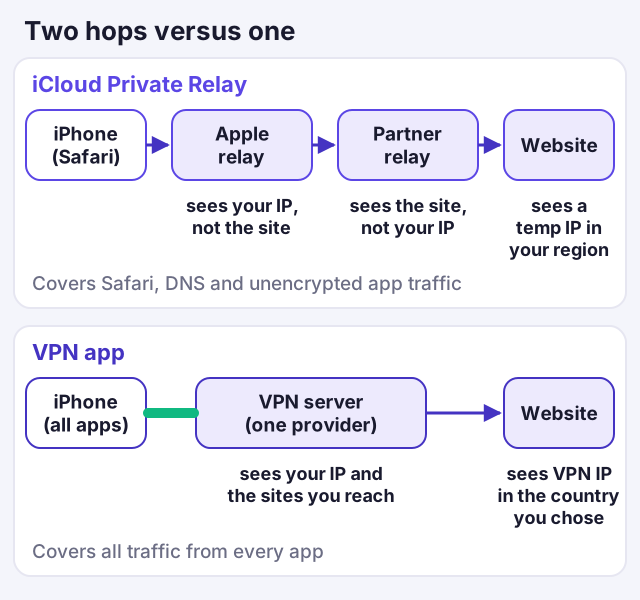
What it covers is set out in Apple's technical overview. Private Relay "protects all web browsing in Safari and unencrypted activity in apps", and it uses Oblivious DNS over HTTPS to protect the DNS lookups "for all queries sent by the device". So it reaches beyond Safari in two ways: every app's DNS lookups, and any app traffic sent over plain, unencrypted HTTP. What it doesn't cover is the encrypted HTTPS traffic that most modern apps use. A banking app, a messaging app or a streaming app is talking to its servers over your normal IP address, Private Relay or not.
There are other edges. Private Relay needs a paid iCloud+ plan; in the US those start at $0.99 a month for 50 GB of storage (Apple Support, checked 10 Oct 2026). It isn't available in every country or region, and Apple says it "automatically turns off" when you travel to one where it isn't. Some cellular services never use it, including MMS, Visual Voicemail and tethering traffic. And it deliberately keeps your approximate location: you can choose an IP that maps to your general area or to your country and time zone, but Apple says Private Relay "does not allow users to represent themselves as connecting from a different country or region".
How a VPN works (one hop)
A VPN app on your iPhone creates an encrypted tunnel from the phone to a server run by the VPN provider. All your device's traffic, from every app, goes through that tunnel. Websites and apps see the VPN server's IP address, in whichever country you picked, and your Wi-Fi operator or mobile network sees only an encrypted connection to that server.
The trade-off is concentration. There's one hop, so the VPN provider is in the position Apple's design splits between two companies: it can see your real IP address and the addresses you connect to. That's why the provider's logging policy matters so much, and why we only describe a VPN as no-logs when an independent audit backs it up with a date. Proton VPN's 2026 audit was its fifth consecutive annual no-logs audit; NordVPN's latest Deloitte engagement ran from November to December 2025 and was announced in February 2026.
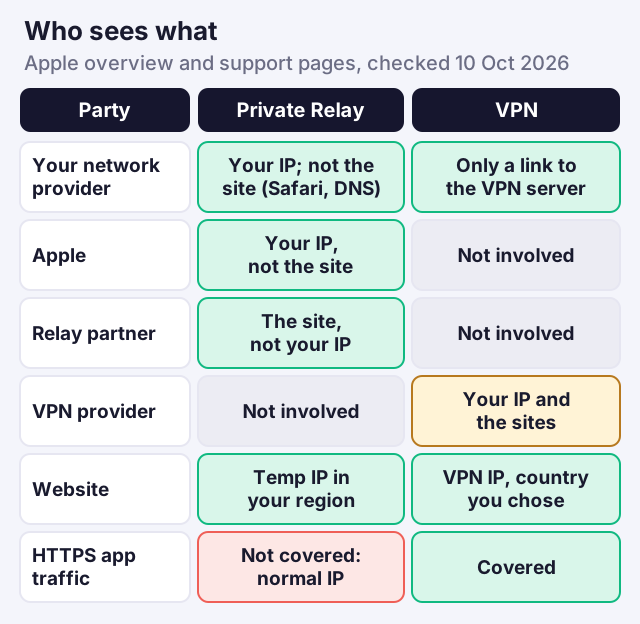
Who sees what: Apple, relay partner, VPN, ISP, website
This is the comparison that decides it for most people. The chart and table below set out what each party can see in each setup.
| Question | iCloud Private Relay | A VPN app |
|---|---|---|
| What it covers | Safari, all DNS lookups, unencrypted HTTP in apps | All traffic from every app |
| Encrypted app traffic (most apps) | Not covered | Covered |
| Hops | Two companies: Apple, then a partner | One provider |
| Can anyone see both your IP and the site? | Not by design | The VPN provider can |
| Choose another country | No; keeps your region | Yes |
| Cost | Needs iCloud+, from $0.99/mo in the US | Free tiers exist; paid plans vary |
| Available everywhere? | No; turns off in unsupported regions | Depends on local law and network blocking |
| Works on Android or Windows? | No, Apple devices only | Yes, most providers |
Two rows deserve emphasis. First, the encrypted-app row: the bulk of what a phone sends is app traffic over HTTPS, and Private Relay leaves all of it on your normal IP address. Second, the "both your IP and the site" row: that's Private Relay's real advantage, and no single-hop VPN can match it, however good its audit.
Using both at once
You can leave Private Relay switched on and install a VPN, but the two don't stack. Apple's overview is explicit: "If a device has a VPN installed, for either enterprise or personal reasons, traffic that goes through the VPN will not use Private Relay." In practice, with the VPN connected, your traffic takes the VPN's single hop and Private Relay steps aside. When you disconnect the VPN, Safari goes back to Private Relay, as long as it's still switched on in your iCloud settings.
On a Mac, Apple goes further. Its support page says a third-party app such as a VPN "might have installed settings" that conflict with Private Relay, and that to use Private Relay you may need to turn off or uninstall that app. If Safari on your Mac reports that Private Relay isn't working while a VPN is installed, that's why.
So the honest rule for using both is to pick one per session. Keep Private Relay as your everyday Safari protection at home, where you trust the network, and switch the VPN on when you're on public Wi-Fi, when you need non-Safari apps covered, or when you need a different country. A note on links: a few below are affiliate links, which pay us a fee when someone subscribes, without raising your price or deciding our verdicts.
What Private Relay leaves exposed on public Wi-Fi
Public Wi-Fi is where the difference shows most. With Private Relay on and no VPN, Safari and every DNS lookup are protected, so the café or hotel network can't read which websites you look up. But your apps still connect over the hotel's network using your normal connection. HTTPS keeps the content of that traffic encrypted, so the network can't read your messages or banking details, but it can still see which servers your apps are talking to and when.
A VPN closes that gap: the network sees one encrypted connection to the VPN server and nothing else. For a phone that spends time on hotel, airport or conference Wi-Fi, that's the strongest single reason to choose a VPN over Private Relay, and it's also why we recommend switching the VPN on for those networks even if you keep Private Relay as your everyday setting.
Which you need
Work through these in order; the first one that applies decides it.
- You use public Wi-Fi often: a VPN, because it covers every app, not just Safari and DNS. Our guide to public Wi-Fi on your phone explains what the real risks are.
- You need to appear in another country: a VPN; Private Relay can't change your region.
- You're travelling somewhere Private Relay is switched off: a VPN, subject to local law.
- You want private browsing and already pay for iCloud+: Private Relay is enough, and it's the only option where no single company sees both ends.
- You have Android or Windows devices too: a VPN, since Private Relay only works on Apple devices.
If you decide on a VPN, Proton VPN's free plan is the zero-cost place to start, with no data cap but one device and a server chosen for you; its paid Plus plan bills $83.76 up front for 24 months (the equivalent of $3.49 per month) and $83.88 per year after that (Proton pricing page, checked 9 Oct 2026). You can compare Proton VPN's plans. NordVPN is our all-round iPhone pick and renews at $139.08 a year for Basic; you can see NordVPN's iPhone plans. For a full shortlist, see our best VPN for iPhone picks.
Setting up each one on iPhone
Private Relay is a switch, not an app. If you have iCloud+, open Settings, tap your name, then iCloud, then Private Relay, and turn it on. In the same place, IP Address Location lets you choose between keeping your general location, so local search results still work, or using only your country and time zone. It applies to every Apple device signed in to the same account that runs iOS 15, iPadOS 15, macOS Monterey or later.
A VPN takes a minute longer. Download your provider's iPhone app, sign in, and tap Allow when iOS asks to add a VPN configuration. After that the app connects with one tap, and most let you set it to connect automatically on untrusted networks. Our phone VPN setup guide walks through the details for both iPhone and Android.
Turning Private Relay off for a network or a site
Sometimes you'll want Private Relay off in one place without switching it off everywhere. Apple provides per-network controls on iPhone and iPad. For a Wi-Fi network, open Settings, tap Wi-Fi, tap the info button next to the network and turn off Limit IP Address Tracking. For mobile data, open Settings, then Cellular (Mobile Data), choose your number under SIMs and turn off Limit IP Address Tracking; on iOS 18 or earlier the option sits under Cellular Data Options.
Apple also notes that some websites "may require extra steps to sign in or access content" without your real IP address, and that sites relying on IP filtering may block you while Private Relay is on. You can show your IP address to one site temporarily; Apple warns that your network provider can then see that you're visiting it. If a work or school network blocks Private Relay, that's the network operator's choice, and a VPN may well be blocked there too.
What neither one does
Neither Private Relay nor a VPN makes you anonymous. Both hide your IP address from websites, but if you sign in to an account, the site knows who you are regardless. Neither stops tracking by cookies, logins or browser fingerprinting on its own. And neither protects you from a phishing page you choose to type your password into. A VPN moves the trust you'd place in your network over to the VPN provider; Private Relay splits trust between Apple and a partner. For what a VPN on your phone actually does day to day, see what a VPN is on your iPhone, and for the wider cross-platform picture our best VPNs for iPhone and Android.
Private Relay vs VPN questions
Is iCloud Private Relay a VPN?
Does Private Relay only work in Safari?
Can I use iCloud Private Relay and a VPN together?
Is Private Relay free?
Can Private Relay change my location?
See the wider picture: the best VPNs for iPhone and Android, or the iPhone-specific picks.