Best VPN for Android (2026): The Apps, the Kill Switch Android Builds In, and the Ones to Avoid
The best VPN for Android in 2026 is NordVPN for most people, Surfshark if one plan has to cover a whole family's phones, Proton VPN if you want a free tier you can trust, and ExpressVPN if you want split tunnelling and a kill switch working at the same time. Mullvad is the pick for keeping account data to a minimum, and it pays us nothing. What separates them on Android isn't the brand: it's how each app handles per-app routing, Android TV and the kill switch that Android itself provides.
That last point matters more on Android than anywhere else. Android has a system-level kill switch built in, but switching it on quietly disables or overrides split tunnelling in most apps, a trade-off the big roundups rarely mention. We'll show you where each app stands, what each costs after the intro price, and which apps not to install at all. Everything below comes from the providers' own pages and Google Play listings, checked on 9–10 October 2026; we haven't run speed or battery tests and don't publish numbers we didn't measure.
The picks, by need
Each pick here earns its place for a specific reason. If you know what you need, jump to that provider; if you don't, NordVPN is the safe default.
NordVPN: the all-round Android pick
NordVPN's Android app covers the features most people end up wanting. You can exclude chosen apps from the VPN with split tunnelling, and NordVPN says its kill switch on Android 8.0 or later "works just like a system-wide Kill Switch", blocking internet access when the VPN isn't connected. It has a separate Android TV app, offers an APK from its own website if you can't use Google Play, and supports its WireGuard-based NordLynx protocol. Its post-quantum option is available on Android as an opt-in setting, and it only works with NordLynx (NordVPN support, checked 9 Oct 2026).
Two NordVPN details are specific to Android. First, Google Play offers a separate 3-day free trial for first-time Android users (not in every country), distinct from the 7-day trial on NordVPN's website. Second, NordVPN handles Google Play refunds itself under its 30-day policy, so buying in the app doesn't cost you the guarantee. One account covers 10 devices at once. Its no-logs claims have been checked six times; the latest Deloitte engagement ran from 10 November to 12 December 2025 and was announced in February 2026. The downside is renewal: NordVPN's own renewal table lists Basic at $139.08 a year, the steepest of the providers here. A note on links: several here are affiliate links, which pay us a fee when you subscribe, without raising your price or shaping the picks. You can see NordVPN's current Android plans.
Affiliate link. We may earn a commission — it never moves a ranking.
Surfshark: best for a household of Android phones
Surfshark's case is the device rule. A paid plan covers unlimited devices at once (its free trial covers 3), so every phone, tablet and Android TV box in the house fits on one subscription. Its split-tunnelling feature, called Bypasser, works two ways on Android: you can send chosen apps around the VPN, or use "Route via VPN" so only the apps you pick use the tunnel. Surfshark's Google Play app needs Android 7.0 or later; its APK also runs on Android 6.0.
Surfshark also has an Android TV app, and an APK you can sideload on a TV that can't reach the Play Store; Surfshark says the same APK file works on both phones and Android TV. Deloitte reviewed its no-logs policy for a second time in 2025. On price, Starter bills $67.23 up front for 27 months (the equivalent of $2.49 per month) and $79 per year after that (Surfshark pricing pages, checked 9 Oct 2026). You can check Surfshark's plans.
Affiliate link. We may earn a commission — it never moves a ranking.
Proton VPN: the free Android tier worth trusting
If you want a free VPN on Android, Proton VPN Free is the one we'd install. Proton says the free plan has "no data or time limits", shows no ads, and includes the kill switch and its Stealth protocol; you get servers in 10 countries, chosen for you rather than picked, on one device at a time, at what Proton itself calls "medium" speed. Streaming and P2P support are paid features. Its no-logs policy has been audited every year since 2022, and the 2026 audit was the fifth in a row. Proton's apps are open source on all its main platforms.
Proton is also the easiest to install without Google: it publishes its Android app on F-Droid and on GitHub, and lists the SHA-256 fingerprint of its signing certificate so you can check an APK before installing it. The catch is the kill switch. On Android, Proton sets it through Android's own system settings rather than an in-app switch, and Proton says that on most platforms the kill switch "is not compatible with split tunneling". Paid Plus bills $83.76 up front for 24 months (the equivalent of $3.49 per month) and $83.88 per year after that: the smallest renewal jump of the big brands. You can compare Proton VPN's free and paid plans.
Affiliate link. We may earn a commission — it never moves a ranking.
ExpressVPN: split tunnelling and a kill switch together
ExpressVPN solves the conflict the others leave you with. Its Android kill switch is on by default and, per ExpressVPN, "does not disrupt split tunneling or access to local devices", so apps you've excluded keep working if the VPN drops. The trade-off is that its kill switch doesn't block anything when you disconnect on purpose; for that you'd use Android's stricter system setting, which ExpressVPN warns turns split tunnelling off. Its Lightway protocol includes post-quantum protection by default using ML-KEM, according to ExpressVPN.
It has Android TV support and an APK on its own website. Note one buying trap: ExpressVPN excludes Google Play and App Store purchases from its 30-day refund promise, so subscribe on its website instead. Basic bills $83.72 up front for 28 months (the equivalent of $2.99 per month) and $99.95 per year after that; its three tiers cover 10, 12 and 14 devices. It was the only app of the five whose Play listing didn't show the independent security review badge when we checked. You can see ExpressVPN's plans.
Affiliate link. We may earn a commission — it never moves a ranking.
Mullvad: minimal-data Android privacy
Mullvad asks for less than anyone: no email or username, just a random account number, and a flat €5 a month whether you pay for one month or a year. It has no affiliate programme and says it never pays for reviews, so nobody earns anything sending you there, us included. Its Android app has been through independent app audits, most recently by Leviathan Security Group (published 1 June 2026) and NCC Group (March 2025), and it supports split tunnelling and a built-in kill switch.
Mullvad needs Android 9 or later and is available from Google Play, its website, GitHub and F-Droid. Its limit is devices: 5 per account. Mullvad's own help page is also the clearest statement of the Android trade-off: with split tunnelling on, Block connections without VPN "will block all excluded apps since they do not use the VPN".
Android capability matrix
The table compares the five apps on Android-specific features. Each cell is what the provider's own pages or its Google Play listing state; a gap means we couldn't confirm it, not that it's missing.
| Provider | Per-app split tunnelling | Kill switch on Android | Android TV app | Install outside Play | Play security-review badge |
|---|---|---|---|---|---|
| NordVPN | Yes (exclude apps) | In-app; system-wide on Android 8+ | Yes | APK from nordvpn.com | Yes |
| Surfshark | Yes (exclude, or route only chosen apps) | In-app | Yes | APK from surfshark.com | Yes |
| Proton VPN | Yes (apps and IPs) | Uses Android's system setting | Yes | F-Droid, GitHub | Yes |
| ExpressVPN | Yes | In-app, on by default; keeps split tunnelling | Yes | APK from expressvpn.com | Not shown |
| Mullvad | Yes (exclude apps) | Built-in; Android 9+ app | Yes | Website, GitHub, F-Droid | Yes |
The Play badge needs context. It means the app "has been independently validated against a global security standard", which Google links to the MASA mobile app security standard. It's a useful signal, but its absence doesn't mean an app is insecure, only that it isn't displayed.
Android's built-in kill switch: turn it on (and know what it costs)
Android has offered Always-on VPN since Android 7.0, with a companion switch called Block connections without VPN (Android developer documentation; ExpressVPN and Mullvad list that switch for Android 8.0 and later). Turn both on for your VPN app and the phone refuses to send anything outside the tunnel, even if the app crashes. On a Pixel or stock Android the path is Settings, Network and internet, VPN, then the gear icon next to your VPN app. On Samsung phones NordVPN gives the path as Settings, Connections, More connection settings, VPN.
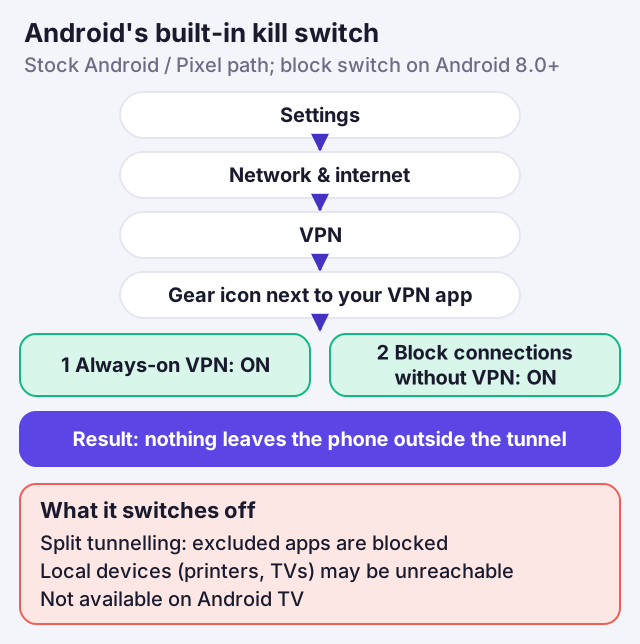
Here's the cost the roundups skip. Android lets a VPN app either include or exclude a list of apps, and with Block connections without VPN switched on, apps sent around the VPN have nowhere to go. NordVPN says that with its own kill switch on (which acts system-wide on Android 8.0 and later), even excluded apps "will be blocked by the Kill Switch when you are connected"; Mullvad says the system setting "will block all excluded apps"; ExpressVPN says split tunnelling "will not work" with the system block on, and that local devices such as printers and smart TVs become unreachable. So decide which matters more to you. If you need a banking app or Android Auto outside the VPN, use the app's own kill switch and leave the system block off. If you want a phone that never leaks, use the system block and give up split tunnelling.
Two more limits. The system block isn't available on Android TV, according to both Mullvad and ExpressVPN, so a TV box relies on the app's own protection. And a strict block can stop hotel and airport sign-in pages from loading; our Android kill-switch walkthrough covers that workaround and how to test that the block works.
Prices with renewal
Android VPN prices look similar on the first bill and diverge sharply at renewal. All figures are US dollars before tax, read from the providers' own pricing and renewal pages on 9 October 2026. VPN prices move frequently and differ between countries, so treat them as a guide and check the final figure when you pay.
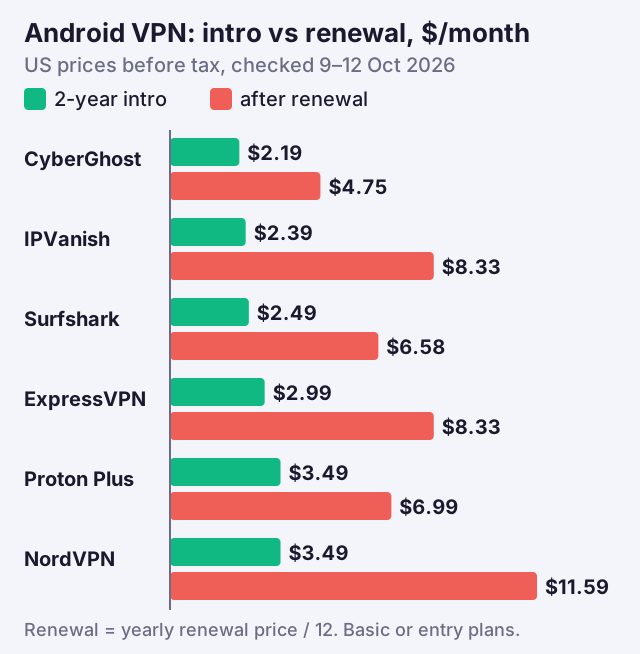
- CyberGhost: $2.19 a month, billed $56.94 for the first 26 months, then $56.94 a year; 7 devices; 45-day money-back on the long plans.
- IPVanish Essential: $2.39 a month, billed $57.36 for two years, then $99.99 a year; unlimited devices.
- Surfshark Starter: $2.49 a month, billed $67.23 for 27 months, then $79 a year; unlimited devices.
- ExpressVPN Basic: $2.99 a month, billed $83.72 for 28 months, then $99.95 a year; 10 devices.
- Proton VPN Plus: $3.49 a month, billed $83.76 for 24 months, then $83.88 a year; 10 devices.
- NordVPN Basic: $139.08 per year on renewal, per NordVPN's renewal table, after a first bill of $94.23 that covers 27 months at $3.49 a month (US pricing page, 12 Oct 2026).
- Mullvad: €5 a month flat, with no intro discount and no renewal jump; 5 devices.
The cheapest first bill isn't the cheapest phone VPN over three years. CyberGhost renews at the same total it charged for 26 months, which still more than doubles the monthly cost, while IPVanish's renewal is more than three times its intro rate. Proton's renewal is closest to its first bill, and Mullvad never changes. Set a reminder a month before your first renewal date: that's when you can switch, cancel or ask for the new-customer price.
The Android VPN apps to avoid
Android's openness cuts both ways. Anyone can publish a "free VPN" in Google Play or on an APK site, and a VPN by design sees every connection your phone makes. These are the apps we'd keep off a phone.
- APKs from mirror sites: NordVPN's Android guide points you to Google Play or the APK on its own website, and Proton tells users not to download its APK "from any other source" than its GitHub page.
- Free apps that can't tell you who runs them: if the listing names no company, no audit and no business model, your data is the likely business model.
- Apps whose Play data label lists data sharing: every app in our matrix declares that it doesn't share user data with third parties; treat a VPN that does with suspicion.
Read the Play data-safety labels with one caveat in mind: they're the developer's own declaration, introduced with the words "the developer says". They're still useful for comparison. NordVPN and Surfshark both declare collecting "installed apps" among other data; Proton declares email, user IDs, phone number, crash logs and purchase history; Mullvad lists user IDs, purchase history, an optional email address, and crash logs and other performance data. None of the five declares selling or sharing data. If you want a free option, Proton Free is the safe default, and Windscribe's free plan (2 GB a month, or 10 GB after confirming an email, in exchange for occasional promotional email) is the alternative with no paid relationship to us.
Android TV boxes and Chromebooks
Android VPN apps also run on two kinds of device that aren't phones, and both behave differently.
On Android TV and Google TV, all five providers have an app, but the safety net is thinner. Android's Block connections without VPN switch isn't offered on TV devices, so the app's own protection is all you have. ExpressVPN's TV app calls its kill switch "Network protection", and its own support pages disagree about whether it starts switched on or off, so open the setting and check. Surfshark's APK, for boxes without the Play Store, is the same file it offers for phones. If a TV box is your main streaming device, set the app to connect on start-up and confirm the kill switch toggle by hand.
Chromebooks that run Android apps can use the same Android VPN app. Proton says its Android app "secures all connections from your Chromebook", including the Chrome browser and Linux apps, not just Android apps. But Proton also warns that on Chromebooks the always-on VPN and kill switch "do not remain enabled after you restart", a ChromeOS limitation it says can't be changed; prefer sleep over shutdown, and re-enable both after a reboot. Work or school Chromebooks are different again: the administrator controls VPN settings there.
How we chose, and what we didn't test
We compared the apps on documented features, not on speed or battery tests. Every capability above comes from the provider's own support pages or its Google Play listing, every price from its own pricing or renewal page, and every audit claim names the auditor and date. We haven't measured throughput, battery drain or connection times on Android hardware, so you won't find those numbers here; results vary too much by phone, signal and server to state honestly without a controlled test.
Manufacturer menus and Android versions
Where the VPN settings live varies by phone. Stock Android and Pixels put them under Network and internet; Samsung uses Connections, then More connection settings. Google's own help page notes that some steps only work on Android 14 and later, so wording on older phones may differ. If you can't find them, search Settings for "VPN".
App requirements vary too. Surfshark's Google Play app needs Android 7.0 or later (6.0 for its APK), NordVPN's system-wide kill switch behaviour needs Android 8.0 or later, Proton's kill switch isn't available on Android 7 or earlier, and Mullvad's app needs Android 9 or later. On any phone, aggressive battery optimisation can close a VPN running in the background; if your tunnel keeps dropping, exempt the VPN app from battery optimisation. For how much a VPN affects battery life in practice, see does a VPN drain your battery, and for the cross-platform picture, our best VPNs for iPhone and Android compare these picks with their iOS apps.
Android VPN questions
What is the best VPN for Android in 2026?
What is the best free VPN for Android?
Does Android have a built-in VPN kill switch?
Can I use split tunnelling and Android's kill switch together?
Is it safe to install a VPN APK on Android?
See the wider picture: the best VPNs for iPhone and Android, or the iPhone-specific picks.