NordVPN Mobile on Android (2026): Features, Settings and What It Costs
The NordVPN mobile app on Android is one of the fuller VPN apps you can put on a phone. It does per-app split tunnelling, a kill switch that cuts off the whole device, Meshnet, a scam and phishing filter that keeps working with the VPN off and, on the Complete and Prime plans, warnings for scam calls and texts. We read NordVPN's Android support pages, its Android download page and its Google Play listing on 12 October 2026 to build this guide; we have not run speed or battery tests.
It's a strong pick if you live on Android and want one subscription for phone, tablet and Android TV, with ten devices per account. Skip it if your phone runs Android 8 or older (the app needs Android 9 or later), if you mainly want a cheap VPN for a year or two, since Basic renews at $139.08 a year, or if you need a VPN in China, where NordVPN says its Android app is fully blocked.
One detail decides more than people expect: where you install it from. The Google Play build includes a 3-day trial but, according to NordVPN, can't block ads because of Play Store policy; the APK on nordvpn.com can. The sections below cover that choice, the settings worth changing, and what it costs once the intro price ends.
What the Android app includes (checked 12 October 2026)
The app was reorganised recently. Its Google Play notes, updated on 30 September 2026, describe main tabs built around three jobs: connect, protect and monitor. NordVPN's Android setup guide, revised the same week we read it, lists what sits where:
- Connect: a "Secure my connection" button that picks the fastest server, a country list, search by country or city, plus Dedicated IP and the specialty servers (Double VPN, Onion Over VPN and Obfuscated).
- Protect, behind the shield icon: Real-time protection, which on a phone means NordVPN's DNS-based scam and phishing filter, along with Call protection and Message protection on plans that include them.
- Monitor, behind the eye icon: Dark Web Monitor, which watches your email addresses for appearances in data leaks.
- Products: Meshnet, NordVPN's private network between your own devices, and links to other Nord apps.
- Profile: account details and multi-factor authentication, app settings, help and diagnostics, referrals and connection statistics.
A small usability point that trips people up: the disconnect control sits next to Pause, and the Pause menu stops protection for a chosen length of time instead. If you're hunting for the off switch, that's where it is. Everything else worth changing (protocol, auto-connect, split tunnelling, post-quantum encryption, custom DNS, local network discovery and the kill switch) lives under Profile, then Settings.
Android vs iPhone vs Windows: the feature map
The same subscription doesn't buy the same features on every device. NordVPN's support centre is explicit about the main gaps, and the chart lines them up for the three platforms most people use.
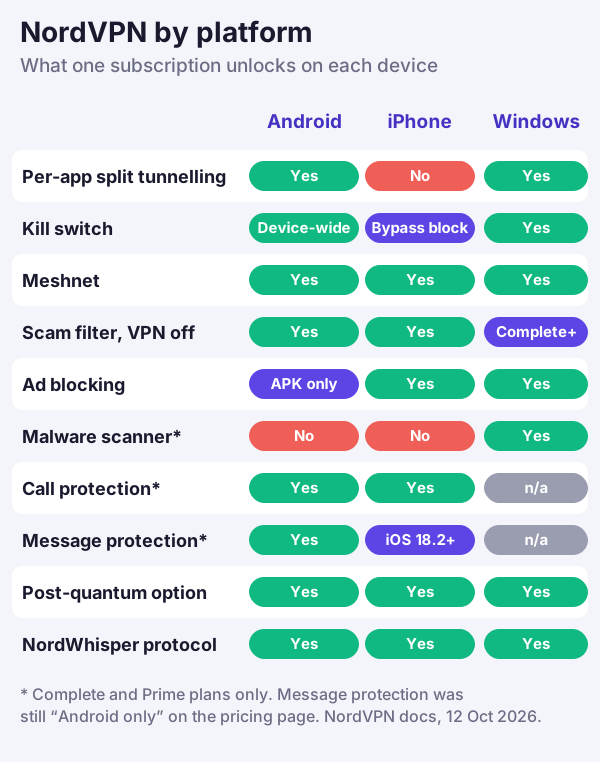
Android comes out ahead of iPhone on two counts: per-app split tunnelling, which NordVPN doesn't offer on iOS or macOS at all, and a kill switch that blocks the whole device rather than iOS's bypass-prevention setting. Where phones fall behind is malware scanning. The full Scam, phishing and malware protection suite runs only on Windows and the website version of the Mac app; Android and iPhone get the DNS filter. Message protection is the moving part: NordVPN's pricing table still labelled it Android only when we read it, while its support centre already had a setup guide for iPhones on iOS 18.2 or later.
Google Play or the APK: which build to install
NordVPN offers several routes onto an Android device, and they aren't interchangeable. Its setup guide names Google Play, Samsung's Galaxy Store and the Amazon Appstore, plus an APK file from its own website.
| Route | Best for | Free trial | Blocks ads | Watch for |
|---|---|---|---|---|
| Google Play | Most phones, tablets and Android TV | 3 days, first-time users (not in Bangladesh, India, South Korea, Sri Lanka) | No, per NordVPN (Play policy) | Plans bought here can't earn referral rewards |
| APK from nordvpn.com | Phones where you want ad blocking | None in the app; NordVPN's 7-day trial starts on its website | Yes | Allow installs from unknown sources; never use a mirror site |
| Samsung Galaxy Store | Samsung phones and tablets | Not stated by NordVPN | Not stated | Listed in NordVPN's Android setup guide |
| Amazon Appstore | Fire tablets and Fire TV | Not stated by NordVPN | Not stated | No kill switch on Fire TV Stick |
| Manual OpenVPN or IKEv2 | Phones on Android 8 or older | None | No | No app features; IKEv2 uses the strongSwan app |
The ad-blocking difference is the one to weigh. NordVPN's Android download page says the APK version blocks ads, while the Google Play version "doesn't block ads due to the Google Play Store's policies". Both builds still filter known scam and phishing sites. If you want the APK, take it only from nordvpn.com and allow installs from unknown sources for that one file. NordVPN warns that modded NordVPN APKs passed around on third-party sites can steal your account login; we wouldn't install one under any circumstances.
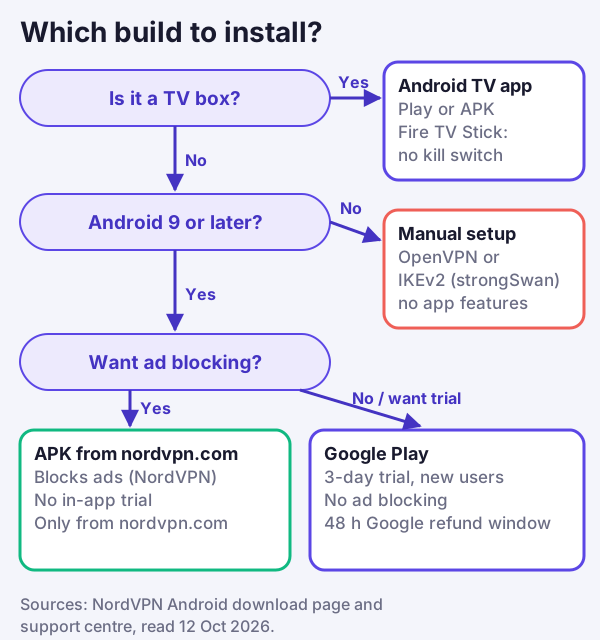
Older phones aren't stranded. The app needs Android 9 or later, but NordVPN documents manual connections for earlier versions: OpenVPN through the OpenVPN client app, or IKEv2 using NordVPN's certificate and strongSwan. You lose everything the app adds, from split tunnelling to Meshnet, so treat it as a stopgap until you change phones. For the general steps on any handset, our guide to setting up a VPN on your phone walks through both app and manual routes.
Kill switch on Android: the app setting and the system one
On Android 8.0 or later, NordVPN's kill switch behaves like a device-wide block: whenever the VPN isn't connected, the phone gets no internet at all. You'll find it under Profile, Settings, Kill Switch. Android adds its own Always-on VPN option, which NordVPN says most phones on Android 7.0 or later include. Samsung owners reach it through Connections, then More connection settings and VPN, where a cog beside NordVPN holds the Always-on switch.
The catch is split tunnelling. NordVPN's help article on how the two features interact says the kill switch takes priority, so apps you've excluded from the VPN lose their connection too while it's on. NordVPN's own advice is that most people who rely on split tunnelling are better served by the app's automatic reconnection, and that the kill switch suits anyone who needs a strict no-traffic-without-VPN rule. Our walkthrough of Android's built-in VPN kill switch covers the system setting and how to test that it blocks.
One device class is left out: NordVPN says that, because of technical limits, the kill switch isn't available on Amazon Fire TV Sticks. If a stick is your main streaming device, a VPN-enabled router is the more reliable safety net.
Split tunnelling, Android Auto and casting
Split tunnelling on Android works app by app. Open Profile, then Settings, then Split tunneling, switch it on and choose the apps that should skip the VPN. NordVPN's own example for drivers is a useful one: if Android Auto can't find your phone while the VPN is running, exclude Android Auto together with your maps and music apps, and everything else stays inside the tunnel.
Casting is the other common snag. A VPN can hide your phone from other devices on the same Wi-Fi, so TVs, printers and cast targets may vanish from view. The fix NordVPN gives is Local network discovery, under Profile and Settings. Turn it on, and if you're casting from an Android phone to an Android TV, turn it on in both apps and keep both devices on the same network. For older Chromecast devices and screen mirroring, NordVPN suggests moving the VPN to the router instead, or using an HDMI adapter, which carries the picture over the cable and ignores the VPN entirely.
Protection that works with the VPN off
Two parts of the app don't need an active tunnel. On phones, NordVPN's Scam and phishing protection (the old name, Threat Protection, still shows up in places) can run without a VPN connection, filtering malicious domains through NordVPN's DNS; on desktops the same filter only works while you're connected. And Message protection, part of Call and Message Protection on Complete and Prime, runs in the background whether or not the VPN is on.
Call protection checks each incoming number against NordVPN's database of scam and telemarketing numbers and puts a warning on the call screen; you can also have it block calls flagged as scams or telemarketing. Message protection scans texts from unknown senders for scam patterns and alerts you. NordVPN says it reads only patterns and keywords and never downloads or stores message content, and that call protection looks only at the caller's number. To use either on Android, NordVPN has to become your default caller ID and spam app and be allowed to manage calls and SMS. On a Pixel, undoing that is a matter of choosing None under Settings, Apps, Default apps, Caller ID and spam app.
That's a lot of access to give one app, so weigh it as you would any caller-ID service. If your phone's own spam filter already catches most junk calls, the VPN alone, on Basic, may be all you need.
Protocols, post-quantum and when it keeps dropping
The Android app offers NordLynx, NordVPN's WireGuard-based protocol, alongside OpenVPN over UDP or TCP and NordWhisper, which NordVPN designed for restrictive networks such as some office and campus Wi-Fi. You choose under Profile, Settings, Protocol, and the choice sticks until you change it. Post-quantum encryption is a separate toggle in the same menu, and it works only with NordLynx.
Auto-connect is worth setting while you're there. Under Profile, Settings, Auto-connect you can pick all networks, Wi-Fi only or mobile data only, and name a country instead of the fastest server. NordVPN also documents a trusted-networks list, so the app can stay off on your home Wi-Fi.
We haven't measured battery drain or speed on Android, so we won't rank protocols on either. What NordVPN does publish is a troubleshooting order for an app that keeps dropping its connection: try each protocol in turn, switch post-quantum encryption off, turn Meshnet off, try an obfuscated server, reset the phone's network settings (which also wipes saved Wi-Fi passwords), restart, and as a last step reinstall using the version from NordVPN's website. For what a VPN does to battery life in general, see does a VPN drain your battery.
Price, trials and refunds on Android
NordVPN's US pricing page, read on 12 October 2026, priced Basic's 2-year term at $3.49 monthly ($94.23 up front for the first 27 months), Complete at $4.49 ($121.23) and Prime at $7.49 ($202.23), all before tax. The renewal is where the cost lands: Basic then renews at $139.08 per year, Complete at $219.48 and Prime at $296.28, per NordVPN's renewal table. For an Android user, Complete is the cheapest plan with Call and Message protection; without those, Basic covers the VPN, the scam filter and ten devices. Prices vary by country and change often, so confirm the total at checkout.
There is no 7-day trial inside the Android app. What Android users get instead is a 3-day free trial through Google Play for people new to NordVPN; it isn't offered in India, Bangladesh, Sri Lanka or South Korea, and you cancel it in Google Play. NordVPN's 7-day trial is a web offer: you start it on nordvpn.com on selected 1- or 2-year plans with a card or PayPal, and it turns into a paid plan unless you cancel. Meshnet is the exception: NordVPN describes it as completely free, so it works in the Android app without a paid plan.
If you pay through Google Play, Google may refund you within 48 hours of the charge; after that, NordVPN's refund policy says its own support handles Google Play refunds under the 30-day guarantee, the same window as a web purchase. Play subscriptions are cancelled in the Play Store rather than your Nord Account, and NordVPN says app-store prices and taxes can differ slightly from its website.
Edge cases worth knowing
- Several user profiles on one tablet. NordVPN says its app protects the whole device but can't run in two Android user profiles at the same time.
- Android TV and Fire TV. The TV app comes from Google Play or as an APK, and you log in by scanning a QR code with your phone or confirming a number shown on screen. Split tunnelling works there. A first-generation Fire TV Stick has no VPN support whatsoever, and NordVPN calls the second-generation and Basic Edition sticks too old for its app.
- Travel to China. NordVPN's help centre says its Android app is fully blocked there and points to a manual IKEv2 setup with strongSwan instead, with no promise that it works. Its guide also asks you to make sure you can still reach your Nord Account and your email.
- Another VPN app on the phone. NordVPN's auto-connect guide asks you to switch off any other VPN apps before setting it up.
- A subscription bought on an iPhone. Your Nord Account works on Android too, but an App Store subscription stays with Apple for billing and refunds.
Should you put NordVPN on your Android phone?
Yes, if you want the most complete version of NordVPN on a phone. Android is the only mobile platform where NordVPN offers split tunnelling, its kill switch blocks the whole device, and the APK build adds ad blocking. Install from nordvpn.com if ad blocking matters, or from Google Play if you'd rather start with the 3-day trial. If price matters more than features, look at the renewal bill first: our Android VPN rankings put NordVPN beside cheaper options, and our iPhone and Android hub compares the picks on both platforms.
If you've decided, you can look at NordVPN's plans for Android here (affiliate link: a purchase through it pays us a commission, and it doesn't change our assessment).
NordVPN on Android: common questions
Is NordVPN good on Android?
Does NordVPN have a free trial on Android?
Can I use NordVPN on Android for free?
Does NordVPN block ads on Android?
Does NordVPN have a kill switch on Android?
Affiliate link. We may earn a commission — it never moves a ranking.
See the wider picture: the best VPNs for iPhone and Android, or the iPhone-specific picks.