Best VPN for iPad (2026): Picks, iPad Settings and One Plan for Every Apple Device
The best VPN for an iPad in 2026 is NordVPN for most people, because one App Store listing covers iPad, iPhone, Mac and Apple TV and one account runs 10 devices at once. Surfshark is better for a family with several iPads, since its paid plans allow unlimited devices. Proton VPN suits anyone who wants a free plan from an audited provider, and Mullvad is the choice if you want an app whose App Store label says it collects no data at all. ExpressVPN is a strong option too, with one caution about where you buy it.
Most "best VPN for iPad" lists are their iPhone lists with the word changed. The app is usually the same, but the questions an iPad owner should ask aren't: how many devices the plan really covers once the whole household shares the tablet, what each app declares in its App Store privacy label, and what iPadOS can and can't do compared with Android. Everything below comes from App Store listings and provider pages checked on 9–10 October 2026. We haven't run speed or battery tests on iPad hardware and don't publish numbers we didn't measure.
The picks
Each pick is here for a specific reason. All of them run on current iPads: the oldest requirement among them is iPadOS 15 (ExpressVPN), and NordVPN, Proton and Mullvad need iPadOS 17 or later.
NordVPN: the default for an all-Apple household
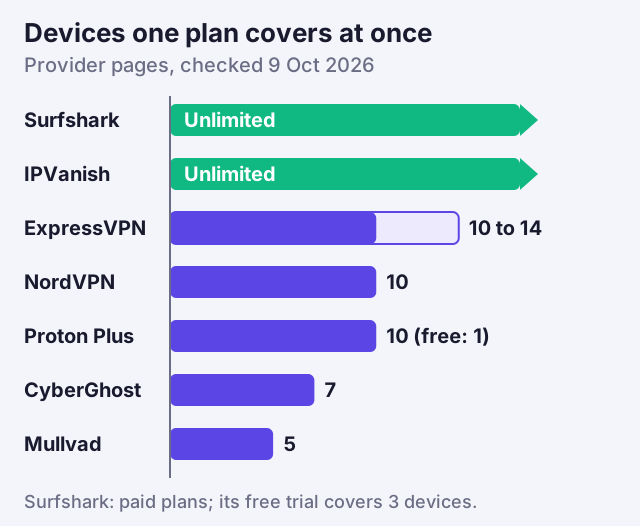
NordVPN's App Store listing requires iPadOS 17.0 or later and lists iPhone, Mac, Apple TV and Apple Vision requirements on the same page, so a single subscription follows you across every Apple device. A single NordVPN login works on up to 10 devices simultaneously. On Apple's platforms NordVPN's protection against traffic slipping outside the tunnel is a feature it calls VPN bypass prevention, which it says "remains effective during app restarts, sleep and wake" (NordVPN support, checked 9 Oct 2026). Its no-logs claims were most recently checked by Deloitte in an engagement that ran from November to December 2025.
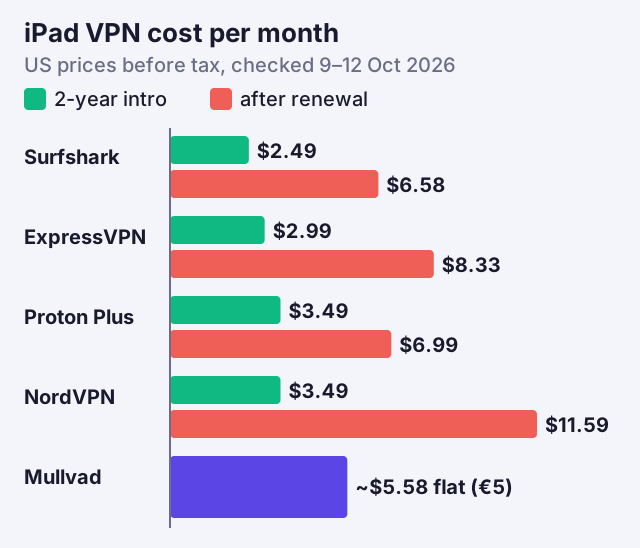
Two limits to know. NordVPN documents split tunnelling only for Windows, Android, Android TV and its browser extension, so don't expect per-app routing on iPad. And if you subscribe inside the iPad app, NordVPN can't refund you; App Store refunds go through Apple. NordVPN's renewal table puts Basic at $139.08 per year after the first term, the highest renewal here; on 12 Oct 2026 its 2-year Basic plan cost $3.49 a month, billed as $94.23 up front. A note on links: a few here are affiliate links, which pay us a fee when you subscribe, without raising your price or shaping the picks. You can see NordVPN's plans.
Affiliate link. We may earn a commission — it never moves a ranking.
Surfshark: unlimited iPads on one plan
Surfshark's App Store listing requires iPadOS 16.1 or later and also covers Apple TV. For a tablet-heavy home its key feature is simple: paid plans don't cap how many devices connect at once (the free trial stops at 3). A family where each child has an iPad, plus phones and a Mac, never has to count. Surfshark lists its Bypasser split-tunnelling feature on iOS as well as Android, though it doesn't describe how the iOS version differs.
Surfshark Starter takes $67.23 up front for 27 months, about $2.49 per month, and $79 per year from the first renewal (Surfshark pricing pages, checked 9 Oct 2026). You can check Surfshark's plans.
Affiliate link. We may earn a commission — it never moves a ranking.
Proton VPN: the free iPad VPN worth trusting
Proton VPN's listing requires iPadOS 17.0 or later. Its free plan has no data or time limits and no ads, but it covers a single device at once, on servers in 10 countries that Proton chooses for you. On iOS, Proton says its always-on VPN is "permanently activated" in the app, and it lists an Advanced kill switch for iOS and iPadOS as a beta feature. Its no-logs policy was audited for the fifth consecutive year in 2026. In the App Store's privacy section, Proton declares only email address and crash data, neither linked to your identity.
Proton VPN Plus takes $83.76 up front for 24 months, about $3.49 per month, then $83.88 per year, and covers 10 devices. Its Apple TV app needs a paid plan. You can compare Proton VPN's free and paid plans.
Affiliate link. We may earn a commission — it never moves a ranking.
ExpressVPN: buy it on the web
ExpressVPN's App Store listing supports iPadOS 15 or later, the widest range here, which matters if your iPad is older and stuck on an earlier iPadOS. Its Basic, Advanced and Pro tiers cover 10, 12 and 14 devices respectively, and ExpressVPN says its Lightway protocol ships with post-quantum protection switched on.
The caution is about where you buy. ExpressVPN's own Apple TV page states that App Store and Google Play purchases fall outside its 30-day refund promise, leaving any refund to Apple. Buy on ExpressVPN's website, then sign in on the iPad. Basic takes $83.72 up front for 28 months, about $2.99 per month, then $99.95 per year. You can see ExpressVPN's plans.
Affiliate link. We may earn a commission — it never moves a ranking.
Mullvad: the app that says it collects nothing
Mullvad's App Store listing requires iPadOS 17.0 or later and carries the only privacy label among our picks that states: "The developer does not collect any data from this app." Accounts are a random number with no email or username, and the price is €5 a month flat. Mullvad covers 5 devices and has no Apple TV app. It has no affiliate programme, so we earn nothing by recommending it, which is exactly why it belongs on the list.
What's different on iPad
The iPad runs the same VPN apps as the iPhone, but four things change how you should choose and set one up.
- It's often shared. A family iPad, plus each person's phone, adds up fast against a device limit. Mullvad's 5 devices and CyberGhost's 7 can run out in a single household; unlimited plans or a 10-device plan leave room.
- Many iPads are Wi-Fi only. A Wi-Fi-only iPad spends its life on networks you don't control when it travels: hotels, trains, cafés. That makes auto-connect on untrusted Wi-Fi the setting that matters most.
- There's no per-app control from iPadOS itself. Android lets VPN apps route individual apps in or out; on iPadOS, per-app VPN is a managed-device feature for organisations, so split tunnelling depends entirely on the provider (NordVPN doesn't offer it on iPad).
- There's no system kill switch. Unlike Android's Block connections without VPN, iPadOS has no general switch that stops all traffic outside a VPN; protection depends on each app's own features, such as NordVPN's bypass prevention or Proton's always-on behaviour.
None of these is a reason to skip a VPN on a tablet. They're reasons to check the device count and the app's own protection features before you buy.
Cellular iPads and Personal Hotspot
A cellular iPad adds two wrinkles. First, mobile data is a network like any other, so decide whether you want the VPN on it too; most apps let you choose auto-connect on cellular separately from Wi-Fi. On a trusted mobile network the case for a VPN is weaker than on hotel Wi-Fi, but it still hides your browsing from the carrier and gives you a choice of location.
Second, a cellular iPad can share its connection through Personal Hotspot. Don't assume the iPad's VPN protects the laptop or phone that joins that hotspot. Apple's own Private Relay overview lists tethering traffic among the things that never use Private Relay, which is a reminder that connection-sharing is handled separately from the iPad's own traffic. The safe setup is to run the VPN on each device that connects, which is where a plan with plenty of device slots pays off.
Connect On Demand on iPad
iPadOS doesn't have Android's hard kill switch. Instead, VPN apps on iPhone and iPad keep you connected using Apple's on-demand rules, which the app installs as part of its VPN configuration. They tell iPadOS to reconnect the tunnel whenever the device has a network connection, or only on networks you mark as untrusted.
In practice, look in your VPN app's settings for an option to connect automatically, ideally on any Wi-Fi network you haven't marked as trusted. Once it's on, iPadOS reconnects the VPN after sleep, restarts and network changes without you opening the app. There can be a brief gap while the tunnel comes back after a network switch; the app re-establishes it rather than hard-blocking traffic the way Android can. Our guide to always-on VPN on iPhone covers the same settings in more detail, and they work the same way on iPad.
One subscription across iPhone, iPad and Mac
A VPN subscription belongs to your account, not to a device. Buy it once, sign in to the provider's app on each device, and every active connection counts against the plan's limit. NordVPN's single App Store listing covers iPhone, iPad, Mac, Apple TV and Vision; Surfshark's covers iPhone, iPad, Apple TV and Vision, with a separate Mac listing; Proton's covers iPhone, iPad, Apple TV and Vision.
The one decision that matters at checkout is where you pay. If you subscribe through the App Store, Apple bills you and handles refunds, and the provider's own money-back promise may not apply: NordVPN's refund policy rules out App Store payments, and ExpressVPN leaves them outside its 30-day promise. If you buy on the provider's website, its guarantee applies on its terms. Either way, the iPad app is identical.
Prices with renewal
The table lines the picks up on the questions that matter for an iPad. Prices are US dollars before tax, taken from each provider's own pages on 9 October 2026; they move often and differ by country, so check the final figure when you pay.
| Provider | Requires | Devices | Apple TV app | App Store privacy label | Two-year intro, then renewal |
|---|---|---|---|---|---|
| NordVPN | iPadOS 17+ | 10 | Yes | Email and account ID linked to you | $3.49/mo ($94.23 for 27 mo, 12 Oct 2026), then $139.08/yr |
| Surfshark Starter | iPadOS 16.1+ | Unlimited | Yes | User ID and usage linked to you | $2.49/mo ($67.23 for 27 mo), then $79/yr |
| Proton VPN Plus | iPadOS 17+ | 10 (Free: 1) | Yes, paid only | Email and crash data, not linked | $3.49/mo ($83.76 for 24 mo), then $83.88/yr |
| ExpressVPN Basic | iPadOS 15+ | 10 (12/14 on higher plans) | Yes | Email and user ID linked to you | $2.99/mo ($83.72 for 28 mo), then $99.95/yr |
| Mullvad | iPadOS 17+ | 5 | No | No data collected | €5/mo flat, no renewal jump |
Read the privacy labels for what they are: the developer's own declaration, which Apple notes it hasn't verified. They're still a fair basis for comparison, and the spread is wide, from Mullvad's "no data collected" to apps that link an email address and an account ID to your identity for marketing and analytics.
On price, the pattern is the same as everywhere: the two-year intro rate is the cheapest month you'll pay. Proton's renewal sits closest to its first bill, Surfshark's renewal is the lowest yearly figure among the big brands here, and NordVPN's is the steepest. Mullvad never changes. If your iPad is the only device you'll protect, a plan's device limit hardly matters and price after renewal should decide it; if the iPad is one of many, start from the device count.
For the iPhone side of the same decision, see our best VPN for iPhone picks, and for the cross-platform comparison with Android, our best VPNs for iPhone and Android.
iPad VPN questions
What is the best VPN for iPad?
Is there a free VPN for iPad?
Can I use one VPN subscription on my iPhone and iPad?
Does iPad have a VPN kill switch?
Should I buy a VPN through the App Store on iPad?
See the wider picture: the best VPNs for iPhone and Android, or the iPhone-specific picks.